

A field guide to SeoTools for Excel, and the alternative that lives outside the spreadsheet
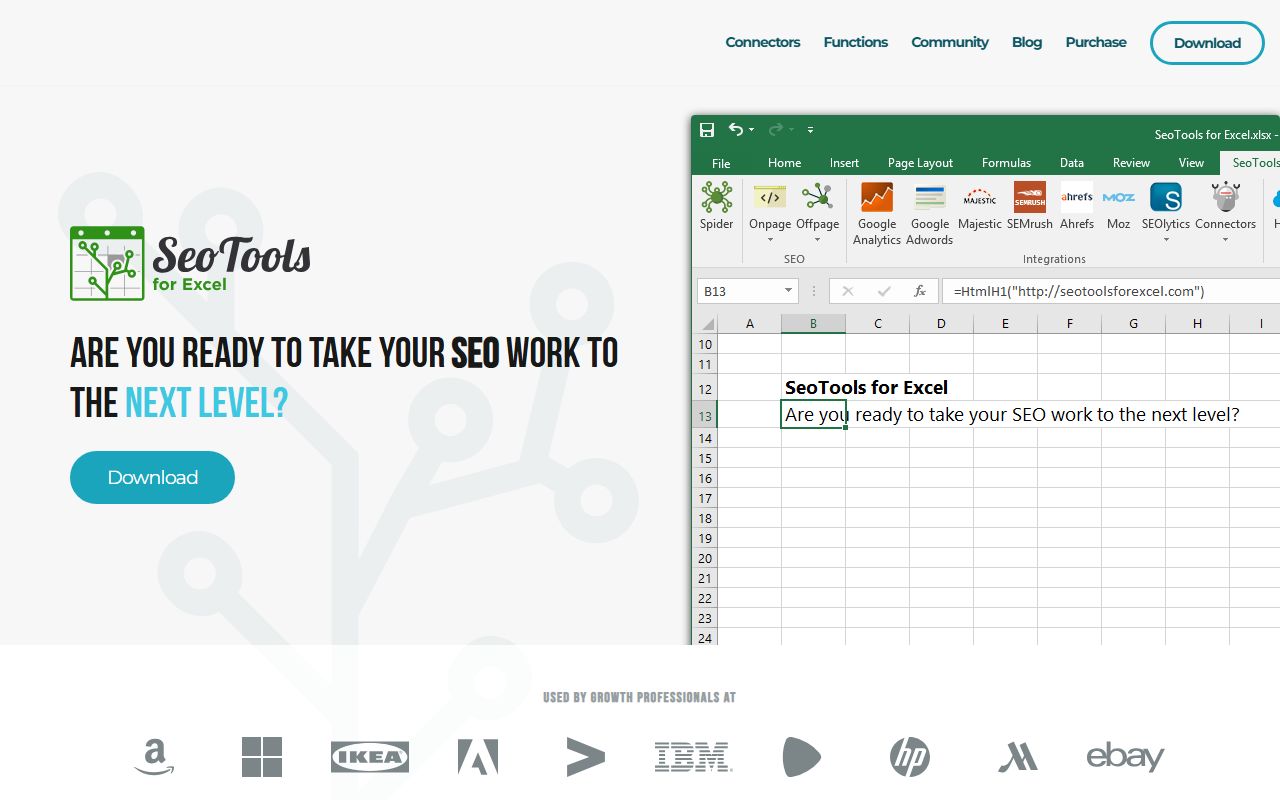
SeoTools for Excel announces itself by reading its own H1 into a cell. This guide identifies the species, maps its habitat and diet, and says honestly when a JSON backlink API is the better animal to keep.
Our index records 1,889 backlinks from 360 referring domains to seotoolsforexcel.com, with a Domain Rating of 35 on our own scale (not Ahrefs DR, not Moz DA). 84.4% of the links are dofollow. The first thing the data shows is concentration: twaino.com alone sends 381 links, 20.2% of the whole profile, from just 14 pages. They are mostly translated copies of one tool write-up that links to the documentation page of many of the functions, which is why CheckBacklink, HtmlH1, DomainAge and SpinText sit among the top anchors at around 20 links each, and why the translators rendered Majestic as 'Maestoso' and Spider as 'Ragno'.
The second thing is who else links in. Serpstat (62 links), SE Ranking (46), Sistrix (20 on .com), AppTweak (30), Mailchimp (15), Moz (10) and Ahrefs (6) are largely integration pages: many of the vendors and services the add-in connects to also document the add-in. Eleven of the top 100 referring domains have a DR of 50 or more, and none of the 360 are .gov or .edu. The name has no agreed spelling either: 'SEO Tools for Excel' (188) beats the company's own 'SeoTools for Excel' (134).
SeoTools for Excel at a glance
- What it is
- A Windows add-in for Excel with more than 100 worksheet functions and a library of connectors to outside services
- Made by
- Bosma Interactive AB, Sweden; the site credits Niels Bosma as creator
- Current version
- 10.0 (the update endpoint returned 10.0.8.0 on 2026-10-08)
- Price
- 129 EUR per machine per year; 103.20 EUR each for 2-4, 96.75 EUR for 5-9, 90.30 EUR for 10 or more
- Trial
- 14-day full trial, requested from inside the add-in
- Platform
- Excel on Windows. The site says plainly: no Mac, no Linux, no Google Docs
- Own public API
- None found. The data comes from each connected vendor
Field marks: how to recognise SeoTools for Excel
Spotting one is easy. Open the homepage and you get a cropped Excel window titled SeoTools for Excel.xlsx, a ribbon tab with buttons for Spider, Onpage, Offpage, Majestic, SEMrush, Ahrefs and Moz, and a formula bar reading =HtmlH1("http://seotoolsforexcel.com"). Nearby cells hold the site name and the page's own headline.The homepage demo has the product reading its own page, which says what it is for: pulling web data into cells.
The company describes it as a Windows add-in for Microsoft Excel that adds more than 100 worksheet functions and a library of API connectors. The word to watch is connectors. The title says 'API connectors', and that means connectors to other companies' APIs, not an API you can call. We looked for one: /api/ and /api-docs/ on the site both return 404, and the only machine-readable endpoint we found is a text file with the latest version number.
That one fact decides how this guide compares the two. There are no SeoTools units, rate limits, auth headers or JSON responses to line up against ours. What can be compared is the job: getting backlink numbers into a place where you can work with them.
Habitat: Windows, Excel and a licence tied to a machine
The species is picky about where it lives. The purchase page states it without softening: Just plain old Excel & Windows. Installation drops a 32-bit or 64-bit .xll file into Excel. If your team works on Macs, in Google Sheets or in a Linux CI job, this animal cannot join the colony.
Licensing is just as territorial. The price is 129 EUR per machine per year, with unit prices falling to 103.20 EUR for two to four licences, 96.75 EUR for five to nine and 90.30 EUR for ten or more. It is not a recurring subscription; the FAQ says you decide next year whether to renew. A licence can be moved, and each one can be activated on a different computer ten times. Tax treatment and refund terms are not published on the pages we read.
There is a 14-day trial with every connector and function available, requested from inside the add-in once it is installed. Without a licence, the Majestic page says its sponsored connector can be used for free, and the 2017 7.0 post names Majestic and AccuApi as the only free features. The site is not fully consistent here: its llms.txt mentions a free tier, so treat 'free' as meaning the sponsored connectors and the trial. At least one directory still calls the tool 'freemium', a model the 7.0 post says was discontinued in 2017.
Diet: what it eats, and who pays for the meal
A 129 EUR licence buys the spreadsheet functions and the connectors. It does not buy the data. The Ahrefs connector page says using your Ahrefs account; Moz asks for an Access id and Secret key; SEOkicks wants an App Id; SEO PowerSuite and DataForSEO need their own accounts. The real cost of backlink data in SeoTools is the licence plus whatever each upstream vendor charges. We did not research those vendor prices and will not guess them.
The connector views are the closest thing to an endpoint list, so here they are matched to our actions:
| SeoTools connector view | apibacklinks action |
|---|---|
| Majestic 'Index Data', Ahrefs 'Domain Rating', SEO PowerSuite 'Metrics' | domain, overview, bulk_dr |
| 'Referring Domains', 'Ref Domains', SEOkicks 'Linking Domains' | refdomains |
| 'Backlinks', 'One per Domain', SEOkicks 'Linking Pages' | backlinks (group by domain or page) |
| 'Anchor Texts', 'Anchors' | anchors, anchor_cloud |
| 'Top Pages' | toppages |
| Ahrefs 'Ref Domains by TLD Type' | tld_breakdown |
Some prey has no counterpart on our side: 'New & Lost backlinks', 'Broken backlinks', Majestic's Topical Trust Flow and Ahrefs' traffic positions. Those views exist because the vendors behind the connectors run proprietary crawlers and keep history. We run neither.
Behaviour: recalculation, caching and the one native backlink function
Watch the animal work and one habit stands out: it is careful with other people's money. The 10.0 release notes add a Recalculate menu, with the author explaining that each request costs money and it is not practical to manually update each cell. Anyone who has fat-fingered a refresh over a few thousand cells of a metered API will recognise the instinct. Caching helps too: within a session SeoTools fetches a page once and lets all cached functions reuse it.
The only backlink function SeoTools owns outright is CheckBacklink. Its signature is =CheckBacklink(pageUrl, expectedLinkHref, expectedLinkText, checkNofollow), and it verifies that a link is on a given page with the right text and no rel=nofollow. Note what that is: a live check of one page you already know about. It does not discover anything. Discovery is what an index does, and ours does it with a delay of weeks, because it is built from crawl releases roughly monthly. A fresh placement will not show in our data immediately, whereas CheckBacklink fetches the page at the moment you run it. If you need to know today whether a purchased link is in place, the add-in answers that better than we can.
The nest: reading SeoTools' own link profile
A field guide should show the nest. Pull the report for the brand's own domain in our free explorer and a few things stand out.
- The top 20 referring domains run from twaino.com (381 links) down to pineberry.com (12). The bare-URL anchors, such as
http://seotoolsforexcel.com/with 61 links, show that older links are still in the graph: thehttp://homepage URLs collect 438 links against 573 for thehttps://ones. - The link graph remembers retired things. Three sites still link to a trial URL on the old store subdomain that now answers HTTP 410 Gone, and one directory still calls the tool 'Freemium'.
- There is no commercial anchor. The top 25 anchors are spellings of the name, bare URLs, function names and 'here'. Eight spellings of the brand name together account for 548 links, 29% of the profile.
None of this is a criticism of the product. The anchors are mostly the tool's name and its function names, and many of the strongest referrers are vendor integration pages. The top 100 referring domains carry 1,305 of the 1,889 links, 69% of the profile.
Where SeoTools for Excel is the better animal
Plenty of work belongs in a spreadsheet, and we would rather say so than pretend otherwise.
- Your analysts live in Excel. If the deliverable is a workbook that a colleague opens on Monday,
=HtmlTitle(A2)beats writing a script. - You need on-page checks next to link data. Titles, H1-H3, canonicals, word count, HTTP status, redirect chains and a Spider that crawls from a root URL are all inside the add-in. We have none of that.
- You already pay Majestic, Ahrefs or Moz and want their full data, including new and lost links, in cells. The connectors exist for exactly this, and our index is a smaller, slower sample by comparison.
- You verify placements live.
CheckBacklinkwith wildcards fetches the actual page now. We report what a monthly crawl saw. - You want to build your own connector. The XML connector format and the open-sourced connector suite let you wire up nearly any service, on a sheet.
If that describes your week, keep the licence. Buying an API will not make your spreadsheet better.
Cross-breeding: when the data must leave the spreadsheet
The species struggles in three environments. Servers: an add-in that lives inside Excel on Windows is not something a scheduled job or a CI run can call. Scale: our bulk_dr action returns DR and counts for up to 2,000 domains in one request. Teams not on Windows: anyone on a Mac or a browser cannot open the add-in at all.
Arithmetic helps here. Our credit is $0.0001, so a lookup costs 1 credit and a list call such as refdomains or backlinks costs 2; that is $0.20 per 1,000 list calls, and each call can return up to 1,000 rows. The $100 starter credit on first Google sign-in covers 1,000,000 credits, or 500,000 list calls, with no card. For comparison, Ahrefs bundles API v3 units into its subscriptions (Lite is $129 a month for 200,000 units) and charges at least 50 units per metered request, which caps that plan at 4,000 billable requests a month. Whether SeoTools' Ahrefs connector works with API v3 today is not stated on its page, which was last updated in 2021, so we claim nothing either way.
You can also try combining the two. SeoTools documents JsonPathOnUrl, which fetches a URL and returns the result of a JSONPath expression, with control over headers. In principle that can read a GET endpoint like ours into cells. We have not tested it, so treat it as an idea rather than a recipe. The full list of actions is in our API docs, and the wider landscape of API vendors is in the backlink API roundup.
Sighting notes: what apibacklinks lacks
The alternative has its own weaknesses, and a guide that lists only one animal's flaws is a pamphlet.
- Our index comes from our web link data: 181,132,097 domains, 2,774,625,913 domain-to-domain links and about 798.6 billion page-level backlinks. That is large, but it is a broad sample, smaller and less fresh than the proprietary crawlers behind the vendors SeoTools connects to.
- No new or lost report, no alerts, no scheduled exports, no broken-link report, no toxic score, no keyword research, no rank tracking, no traffic estimates and no historical charts.
- Our Domain Rating is our own metric, computed from referring-domain counts in our graph. It is comparable in spirit to other tools' scores, not equal to them.
What you get in return is plain: one endpoint, JSON, CORS enabled, no seat licence, no machine activation and no second vendor account. For a developer who wants a number in a script, that is the whole point. For a marketer who wants a dashboard, it is not.
apibacklinks vs SeoTools for Excel
| apibacklinks | SeoTools for Excel | |
|---|---|---|
| What it is | A JSON API plus a free online explorer | A Windows add-in for Excel with 100+ worksheet functions and connectors to other vendors' APIs |
| Own backlink index | 181,132,097 domains, 2,774,625,913 domain-to-domain links, about 798.6 billion page-level backlinks | None; data comes from the vendor behind each connector |
| Own public API | 19 actions on one endpoint, api.php?action=<action>&q=<domain> | None found (/api/ and /api-docs/ return 404) |
| Price | 1 credit = $0.0001; from $0.10 per 1,000 calls, $0.20 per 1,000 list calls | 129 EUR per machine per year, plus each data vendor's own charges |
| Trial / free start | $100 free credit on first Google sign-in, no card | 14-day full trial; sponsored connectors work without a licence |
| Platform | Any HTTP client, any OS | Microsoft Excel on Windows only |
| Auth | ?key=sk_... or Bearer header for paid actions | Licence key per machine plus each vendor's own credentials |
| Limits per call | Max 1,000 rows per call; deep pagination capped at 50,000 rows | Not published as product limits |
| Live check of one link | No; monthly crawl cadence, not real-time | Yes, CheckBacklink fetches the page live |
| New / lost links | Not available | Via third-party connectors such as Majestic and Ahrefs, depending on the vendor account |
Try it on seotoolsforexcel.com
The same referring-domains view you would build from a connector, as one call against the brand's own domain.
curl "https://apibacklinks.com/api.php?action=refdomains&q=seotoolsforexcel.com&key=YOUR_KEY"
SeoTools for Excel alternative — FAQ
Is SeoTools for Excel an API?
How much does SeoTools for Excel cost?
Can apibacklinks replace SeoTools for Excel?
CheckBacklink. Many teams will want both: the add-in for sheet work and an API for code.Can I use apibacklinks from inside Excel?
JsonPathOnUrl function reads a URL and returns a JSONPath result, so a GET endpoint should be reachable in principle. We have not tested it against our API, so check it on a trial before relying on it.Does apibacklinks track new and lost links?
CheckBacklink in SeoTools is the better fit.Is the DR in apibacklinks the same as in other tools?
Backlink data for the price of a rounding error
Sign up, keep your $100 of credit, call the API today.
Get started free