

A WatchMyLinks alternative, tested bench-style: monitor versus index
WatchMyLinks re-checks the links you tell it about, every 24 hours. An index shows the links you never heard of. These notes run both ideas against watchmylinks.com itself and record what happened.
The first thing I did at the bench was ask our index about the monitor's own domain. The answer came back found: false: DR 0, 0 referring domains, 0 backlinks, no first-seen date, no top anchors, an empty TLD mix. Our graph holds 181,132,097 domains and 2,774,625,913 domain-to-domain links, so absence here means no link to watchmylinks.com showed up in sample of the public web we processed. It does not mean no link exists anywhere.
A second reading helps. The public site is small: a homepage plus about, instructions, contact, privacy, terms, login and register pages, with no blog and no sitemap. A crawler has little to hang a link on. The odd part is that a tool that watches links has none pointing at it in our sample, which shows how different "links I told you about" and "links that exist" really are.
WatchMyLinks at a glance
- What it is
- A backlink monitor: you add links you built or bought, it checks each one every 24 hours and emails you on change.
- Run by
- OK Digital LTD., registered in Rishon Letzion, Israel (per its Terms page).
- Free tier
- 1 domain and 25 backlinks, with daily monitor, bulk upload and export.
- Paid plans
- Light $17/mo (3 domains, 350 links), Standard $25/mo (5, 600), Gold $30/mo (8, 850), plus a custom plan with no published price.
- Payment
- PayPal only, as a recurring payment.
- API
- None found. Data goes in by CSV upload and out by export; alerts arrive by email.
Entry 1: reading the hero screenshot slowly
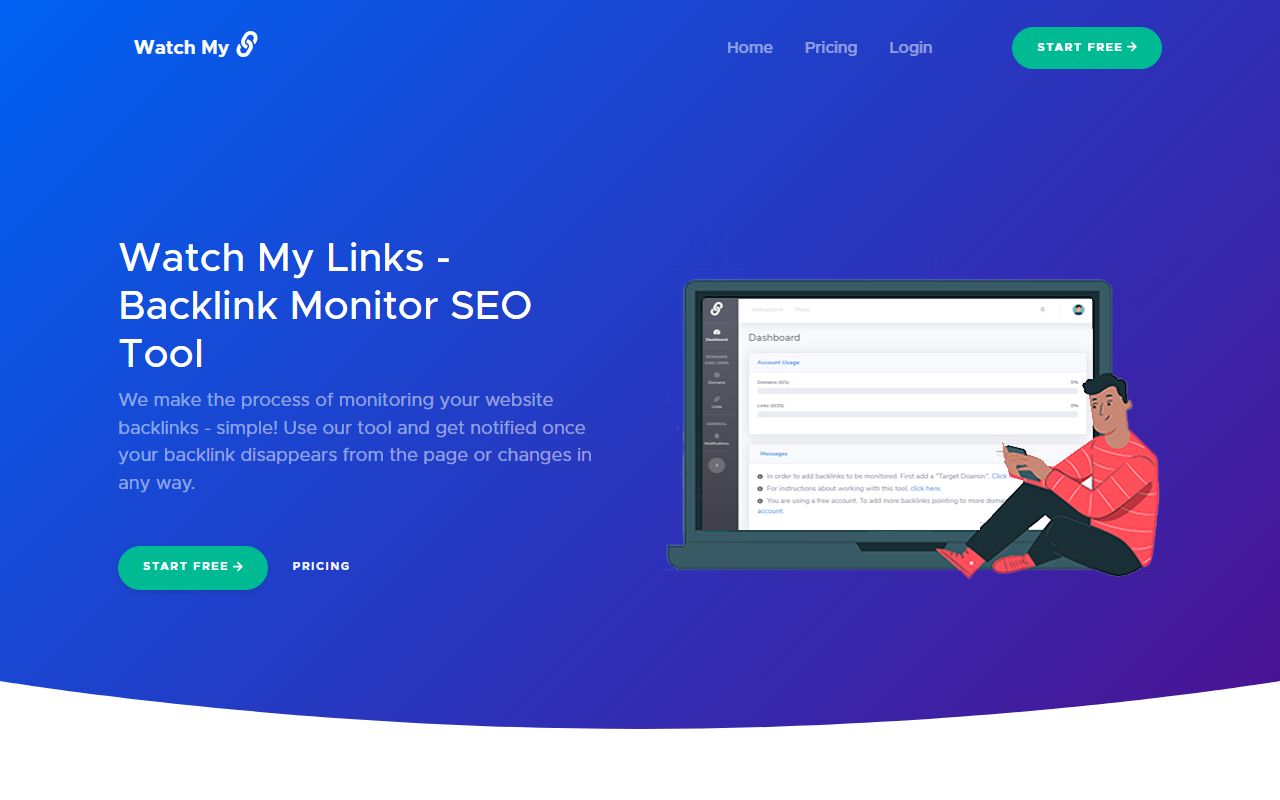
Good lab habits start with looking before measuring, so entry one is just the homepage. A blue-to-purple hero, a logo that says "Watch My" next to a chain-link glyph, a green START FREE button, and on the right a laptop whose screen shows a dashboard. Two panels are legible: Account Usage, with progress bars for Domains and Links, and a Messages box.
Notice also what the hero leaves out. There is no search box, no domain field to type into, no sample report. Many checker homepages invite you to paste a URL and see something at once. This one points you to START FREE and registration instead. My reading, not the company's statement: with a tool built around links you enter yourself, there is little to show before you have added some.
That small detail tells you the product's shape before you read a word. The unit of work is a quota, and the page you live in is a list you filled in yourself. The company's own line sits under the headline: "We make the process of monitoring your website backlinks - simple!" The footer adds a tagline, "We monitor while you sleep."
Write that down as the hypothesis: WatchMyLinks answers one question, is the link I already own still there? The rest of this notebook checks whether anything in a raw index competes with that, and where it does not.
Entry 2: the mechanism, as the instructions page describes it
The instructions page is refreshingly plain. You add a target domain, then add links under it, either one by one or through a CSV import. For each link you record the source URL, the target URL, the anchor text, and whether it is a text or image link. If you bought the link, there are CRM fields too: contact name, email, whether it was exchange, paid or free, and notes.
Once a day the tool fetches each source page and looks for your link. The first check emails you a result. After that you hear from it when something changes, and several changes inside 24 hours are batched into one email that also shows on an in-app notifications page. The homepage promises you will know "within 24 hours Max."
Two choices here are worth a mentor's nod. First, it tells you to follow only links you acquired, not organic ones, because you were not involved in getting those. Second, it admits a limit in print: some sites block its checker, and then you get a message that it cannot access the site.
What it does not claim is equally clear: no discovery of unknown links, no authority score, no competitor view, no referring-domain report.
Experiment A: the same domain, asked of an index
Here is the bench result, with the calls that produced it. All of them are free or nearly so on our side.
| Call | Result for watchmylinks.com |
|---|---|
overview | found: false, DR 0, 0 referring domains, 0 backlinks |
refdomains | no rows |
anchors | no rows |
search for the word watchmylinks | 0 rows |
keyword for the phrase watch my links | 0 rows |
A beginner might read this as "the site is invisible". I would read it as a reminder about what a sampled index is for. It is good at answering who links to a well-linked domain and weak on very small sites. freeserp's own site profile agrees on the number: DR 0 for the domain. You can repeat the lookup yourself in the free explorer, no sign-in needed.
Experiment B: the .app look-alike that is not the same thing
While searching the index for the name, one neighbour turned up: watchmylinks.app. It has DR 4, a single referring domain (seoprobox.xyz), two nofollow links, and a first-seen date of 2026-03-07. The one anchor reads like an advertisement for a link-building service.
Nothing I found connects that domain to OK Digital or to watchmylinks.com, so treat it as a different site that happens to share a name. I log it because this is exactly the trap a monitor never has. You type your own source URLs into WatchMyLinks, so a similar-looking domain can never confuse it. When you search an index by name, you must check which domain you got.
Experiment C: what a monitored link costs per month
The pricing arithmetic is mine, from the published plans, assuming a quota that is full. The site does not state these per-link figures.
| Plan | Price | Domains / links | Per link, full quota |
|---|---|---|---|
| Free | $0/mo | 1 / 25 | $0 |
| Light | $17/mo | 3 / 350 | about $0.049 |
| Standard | $25/mo | 5 / 600 | about $0.042 |
| Gold | $30/mo | 8 / 850 | about $0.035 |
One quirk makes the tiers friendlier than they look: the quota is domains plus a pool of links, and the number of links per domain does not matter. The site's own example is 600 links all pointing at one domain.
Now our side, honestly framed because it is a different job. One credit is $0.0001, and a list call such as backlinks costs 2 credits and can return up to 1,000 rows. A hypothetical site with 20 target pages, asked once each, is 40 credits, or $0.004. That buys a look at who links to those pages today, in a monthly-refreshed sample. It does not buy a daily guarantee about a specific paid placement. Do not read the two columns as like-for-like.
Where WatchMyLinks is the better choice
Let me be direct, as I would with a junior colleague: for the job it was built for, WatchMyLinks beats an index, and it is not close.
- Daily checks of a known URL. Our data refreshes roughly monthly as crawl releases are processed, and a new link can take weeks to show. A removed paid link could sit unnoticed in our data for a long time.
- Alerts. We have no alerts, no monitoring, no new-or-lost report and no scheduled email. It sends you the email.
- A CRM for the people behind the links. Who sold you the placement, how you paid, what the exchange link was. An API returns facts about the web, not your private notes.
- A free start. One domain and 25 links at $0 covers a small portfolio.
- Links the index never crawled. A link on a small blog may never enter a sampled graph. A daily fetch of the exact URL does not depend on a crawl sample, although the site notes that some websites may block its checker.
So if you buy or exchange links and want to know within a day that one vanished, stay. It also fits people who dislike writing scripts.
Rebuilding part of the view with an API
Suppose you want something the monitor does not give you: the links you did not add by hand. That is where an index earns its place, and the recipe is short.
- Pull your current referring domains with
refdomains, which returns up to 100 ranked by links, with donor DR and first and last seen. - Filter
backlinksby your target URL, source TLD or a minimum donor DR, and group by domain or page. - Compare the result against the CSV you already keep for your monitor. Domains in the index but not in your sheet are links you never logged.
- Run
intersecton two or three competitors to find referrers they share and you lack.
That gives you a discovery layer next to your monitoring layer, which is a sensible pairing. If you are weighing other tools in this group, the backlink checker hub lines them up, and the New Backlinks Checker comparison looks at another checker. The full action list is in the API docs.
One practical idea: keep one column in your sheet for the date you last saw the link in the index. When a row stops updating for two or three refreshes, that is your cue to open the monitor and check that placement by hand.
Be clear about the ceiling: this is polling a monthly sample with your own diff. It will never match a daily fetch of a known URL.
Margin notes: what this bench could not measure
A notebook that only lists wins is not worth keeping, so here are the gaps.
- I cannot say whether WatchMyLinks notices a change from follow to nofollow, a noindex tag or a redirect. The site says it alerts on a link that changes "in any way" and reports a "status", but the details are not published.
- Founding year, user counts, links monitored and team size are not published. The footer shows a 2020 copyright and nothing else.
- Whether prices are in US dollars is not stated, only the $ sign. Refund terms are not published either.
- The custom plan has no price or stated limits.
- I found no third-party reviews. The two testimonials on the homepage are on-site only and I cannot verify them.
- Our DR is our own metric, comparable in spirit to other tools but never the same number.
If any of these matter to your buying decision, ask the vendor before you pay.
apibacklinks vs WatchMyLinks
| apibacklinks | WatchMyLinks | |
|---|---|---|
| Core job | Browse who links to a domain in an index | Re-check links you entered, daily, and alert on change |
| Finds links you did not know about | Yes, within sampled coverage | No, you add each link yourself |
| Alerts and email reports | None | Email on change, plus an in-app notifications page |
| Freshness | Roughly monthly, not real-time | Every 24 hours per monitored link |
| API | 19 actions on one JSON endpoint | None found |
| Free start | $100 starter credit on first Google sign-in, no card | Free plan: 1 domain, 25 backlinks |
| Pricing model | Per call, from $0.10 per 1,000 lookups | Flat monthly plans, $17 to $30 |
| Authority metric | Own DR, 0-100, not Ahrefs DR or Moz DA | None stated on the site |
| Payment methods | Credits per call, with a $100 starter credit | PayPal only, recurring |
| Rel / nofollow change detection | Nofollow flag stored per link in the index | not published |
Try it on watchmylinks.com
To see what an index holds for the monitor's own domain, run the free overview, then list the top referring domains.
curl "https://apibacklinks.com/api.php?action=overview&q=watchmylinks.com"
curl "https://apibacklinks.com/api.php?action=refdomains&q=watchmylinks.com&per=20&key=YOUR_KEY"
WatchMyLinks alternative — FAQ
Is apibacklinks a replacement for WatchMyLinks?
Why does our index show nothing for watchmylinks.com?
Does WatchMyLinks have an API?
How much does WatchMyLinks cost?
Can I use both together?
Is watchmylinks.app the same product?
Backlink data for the price of a rounding error
Sign in with Google, keep your $100 of credit, call the API today.
Get started free