

An Oh Dear alternative for backlink data: nine checks, with verdicts
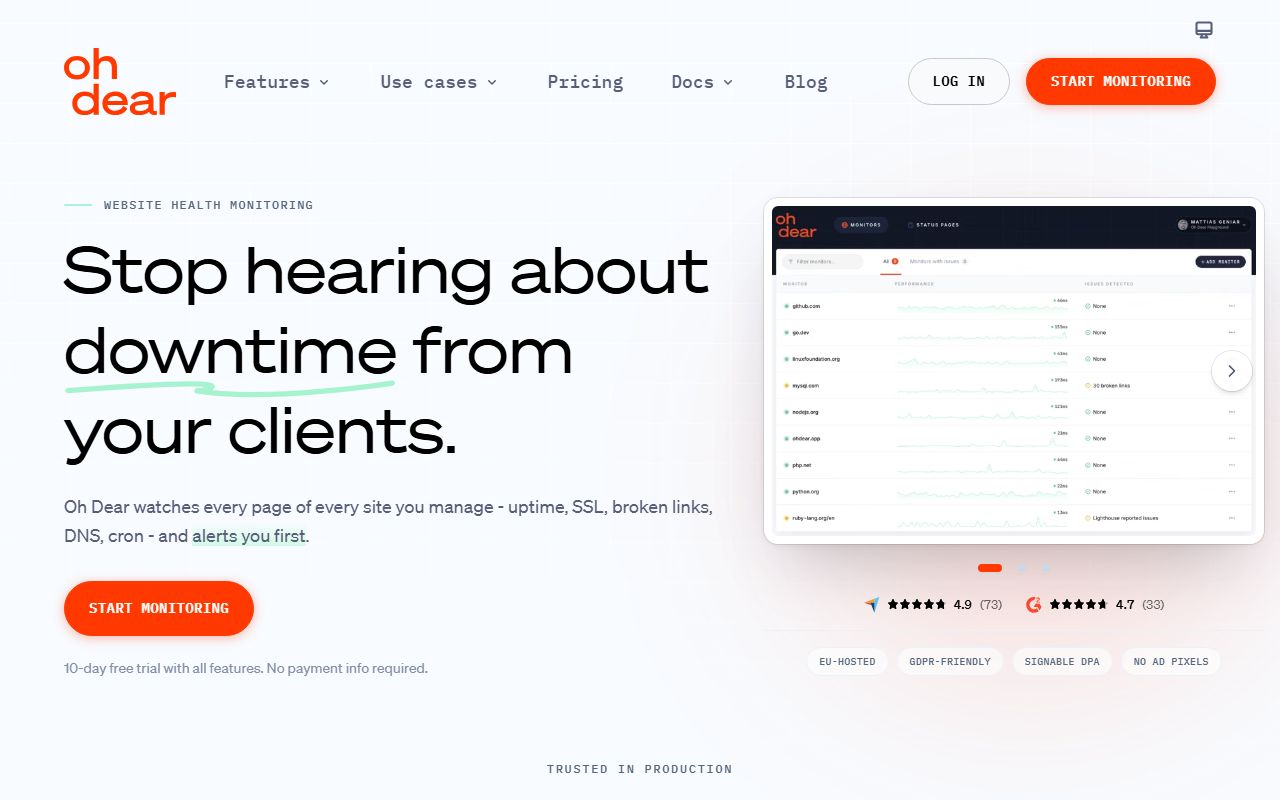
Oh Dear's dashboard lists mysql.com with "20 broken links" and "None" under issues for most other rows. That is a monitoring product, not a backlink checker, so here is a procurement checklist for deciding which one you need.
Oh Dear's own profile in our index shows what the product does to its own links. ohdear.app has Domain Rating 39 (our metric, not Ahrefs DR), 734 referring domains and 70,932 backlinks, 96.8% dofollow. That is about 97 links per referring domain, which means sitewide placements dominate. freek.dev (14,037 links, anchor "free trial") and municibid.com (12,761 links, top anchor "Sitemap") together supply 37.8% of all backlinks. The municibid links all land on a single customer status page, which fits a footer link on a customer's site; the "Sitemap" label is an inference from matching counts.
The anchors read like a customer list. "status page badge" (8,238), "uptime status badge" (2,439) and "status badge" (1,562) add up to 12,239 links from sites that embed its badges, a product feature turning into a link source. Other quirks: the highest-DR referrer, wordpress.org (DR 88), sends 699 links and none are dofollow, and a bare "https://ohdear.app" anchor is only 5% dofollow. A monitor would never show you any of this. Browse it in the explorer.
Oh Dear at a glance
- What it is
- Hosted website health monitoring: uptime, SSL, DNS, cron, broken links, status pages
- Founded
- 2018, by Freek Van der Herten and Mattias Geniar; Immutable VOF, Berlaar, Belgium
- Link crawl
- Daily, stops at 5,000 pages or 20 minutes, JavaScript not rendered
- Pricing
- By site count, from €15/month for 2 sites to €399 for 200; 10-day trial, no permanent free plan
- API
- Public JSON REST API with bearer token, included on every plan; rate limits not published
- Backlink or authority data
- Not offered
Read the dashboard in the screenshot before you read the pricing
The first thing Oh Dear shows you is a list of monitors: github.com, go.dev, linuxfoundation.org, mysql.com, nodejs.org, php.net and so on, each with a latency sparkline and a column called "Issues detected". Most rows say "None". The mysql.com row says "20 broken links". That one row is the whole product for the purposes of this checklist. Oh Dear opens a site you have added, follows its links, and tells you which ones no longer answer.
That is a useful job and it is not the job a backlink checker does. So the first question on any buyer's list is not "which is cheaper" but "which direction do the links point". The rest of this page is a checklist in the order I would run it if I were handed both tools on a Monday. Each item ends in a verdict: pass, fail or depends, and I say what the verdict depends on.
The nine-line checklist, with verdicts
Verdicts are for one specific buyer: someone who landed here looking for a backlink or link-data tool and is wondering whether Oh Dear covers it. If you came for monitoring, read the later section on where Oh Dear wins.
| Check | Oh Dear | Verdict |
|---|---|---|
| Reports who links to any domain | No; it checks links on sites you add | Fail for backlink research |
| Finds dead links on your own pages | Daily crawl, 2xx and 3xx counted as OK | Pass |
| Handles very large sites | Stops at 5,000 pages or 20 minutes | Depends on site size |
| Renders JavaScript | Not rendered | Depends on your front end |
| Authority metric for referrers | None published | Fail |
| Free tier | 10-day trial, no permanent free plan | Depends |
| Public API | Yes, JSON, bearer token, for your own account | Pass for monitoring data |
| Alerts to people | Email, SMS, Slack, Teams, PagerDuty and more | Pass |
| Fits a one-off research task | Built around subscriptions per site | Fail |
Three fails and three depends is not a bad score. It just means the tool was built for a different buyer than the one reading a backlink comparison.
Item 1: do the links point at you or away from you?
Oh Dear's documentation is plain on this. It reports pages that are not HTTP 2xx or 3xx, by default only broken internal pages on the same domain, with external links as an opt-in. The optional resource types are links, images, scripts, stylesheets and Open Graph images. In its own words:
It is not a paste-a-URL tool or a self-hosted crawler you have to maintain. It runs on the sites you are already responsible for.
So the data describes the outgoing and internal link graph of your own pages. It says nothing about the domains that link to you, the anchors they use, or whether a referring page is still live. For that you need an index of the web seen from the other side. Ours is one: 181,132,097 domains and 2,774,625,913 domain-to-domain links from our own web data, queryable by any domain. Try any domain, including the one this page is about, in the free explorer.
Verdict: fail if you wanted backlink data; pass if you wanted to find your own dead links.
Item 2: what the crawler gives up on
Oh Dear publishes its limits, which is the thing I look for first and rarely find. The crawl stops at 20 minutes or 5,000 pages, whichever comes first. It reads the first 512KB of uncompressed content. JavaScript is not rendered. Robots.txt is respected by default and can be switched off; the user agent in your logs is OhDear.app. For sites over 5,000 pages the advice is to add the site several times with different starting URLs.
Read those as an engineer would. A marketing site or a shop with a few thousand URLs fits inside the cap. A forum, a catalogue or a news archive does not, and splitting by starting URL means adding the same site several times, which is worth checking against the site limit of your plan. A single-page app whose links are built in the browser will show the crawler little. None of this is a flaw in the product; it is a clear statement of what a daily, hosted crawl can do. I would still hold your own site's size up against it before buying.
Verdict: depends. Under 5,000 server-rendered pages: pass. Above that, or script-built navigation: test during the trial first.
Item 3: what you pay for, and for how long
Oh Dear prices by the number of sites and servers, and nothing else: the pricing page says every plan has the same features and "the only thing that changes between plans is how many sites you monitor." Published monthly prices, in EUR excluding VAT:
- Solo, 2 sites: €15
- Freelance, 10 sites: €49
- Studio, 25 sites: €99
- Agency, 50 sites: €149
- Portfolio, 100 sites: €249
- Scale, 200 sites: €399
There are intermediate plans too (Solo Plus, Agency Plus, Portfolio Plus) and a custom Enterprise tier above 200. Annual billing is advertised as two months free. Every plan begins with a 10-day trial with no card, and there is a 30-day money-back guarantee for new customers. The site is candid that "per site, we're not the cheapest option", which is a fair thing to say up front.
Our model is the opposite shape. A credit costs $0.0001, so 1,000 lookups cost $0.10 and 1,000 list calls cost $0.20, while the free actions (domain, overview, stats, suggest) cost nothing. There is a $100 starter credit on first Google sign-in, no card, no monthly minimum. If you need a link answer once a quarter, a subscription that renews every month is the wrong shape. If you need a standing monitor on 25 client sites, a metered API that you must write and schedule yourself is the wrong shape.
Verdict: depends on whether your need is continuous or occasional.
Item 4: the API, and what it is an API of
Oh Dear has a real, documented REST API: JSON responses, bearer-token auth, a Swagger UI and a downloadable OpenAPI spec, plus an official CLI and a PHP SDK. It is included on every plan. The line to read is this one: "This API configures Oh Dear itself." Every call is about monitors in your own account. The broken-link endpoints return the latest crawl's failures with fields such as crawled_url, found_on_url, link_text and status_code, and a summary endpoint counts internal and external URLs. Check-run history is kept for about 10 days. I could not find published rate limits in the pages I read, so I will not guess at them.
Where the two APIs overlap is only the shape: JSON over HTTPS with a token. Where they differ is subject matter. Ours takes any domain as the question: refdomains returns up to 100 top referring domains, backlinks filters by anchor, donor DR and date, and compare sets up to 20 domains side by side. There are no monitors to create, no alerts to configure, and nothing that watches for changes. Full parameters are on the API docs page.
Verdict: pass for pulling monitoring and broken-link data into your own tooling; fail for anything about external domains.
Where Oh Dear is the better choice
If your problem is "a client will ring me before my own system does", stay with Oh Dear. The homepage headline says exactly that, and the feature list backs it up: uptime checked every minute from multiple locations, SSL certificate and DNS monitoring, cron job and scheduled task checks, status pages, Lighthouse and sitemap monitoring, mixed content warnings, and notifications to email, SMS, Slack, Microsoft Teams, Discord, Telegram, PagerDuty, Opsgenie and webhooks. We do none of that. We have no alerts, no monitoring, no status pages and no dashboards to hand to a client.
For agencies it also removes a pile of glue. One account covers uptime, broken links, certificates and DNS across the portfolio, with the same features on every plan and no per-client fee. It is hosted in the EU, offers a signable DPA, and the company is open about its limits: no SOC 2 or ISO 27001 certification of its own, no formal SLA with credits, and support on weekdays between 9 and 5 CET. Founded in 2018 by a developer and a sysadmin, it has a long public record. If your list says "must watch certificates", the checklist is already finished and apibacklinks is not on it.
The broken-link check also has one property a data API cannot imitate: it runs on a schedule and tells you without being asked. A daily crawl with a reminder after 7 days if the same links stay broken is a workflow, not a data source.
If you still want the data: the view you can build yourself
Suppose you want what a link report for a client site would contain, and you would rather own the script than buy a dashboard. Five calls cover most of it:
overviewfor DR, backlink count, referring domains and the top-five referrers and anchors. Free.refdomainsfor the top referring domains, with donor DR and first and last seen dates.anchorsfor the anchor mix, which is where odd patterns show up first.toppagesfor the 50 most-linked URLs.bulk_drfor up to 2,000 domains per request when you are vetting a prospect list.
Put them in a cron job, write the rows to a table, and you have a report. What you will not get is history charts, new-and-lost link feeds, alerts, or a spam score; those are not in our API and I am not going to pretend otherwise. Our index also refreshes roughly monthly and is built from our own web data, which is a broad sample rather than a full crawl, so a brand-new link can take weeks to appear. For a monthly client report that is fine. For "tell me the hour a link vanishes" it is not. A hybrid is common: keep the monitor for your own site's health, use the API for the other side of the graph. For other tools in this category, see the page on backlink checkers.
Final score for the person holding the pen
Buy Oh Dear if the thing you are afraid of is your own site misbehaving: downtime, an expired certificate, a dead footer link, a cron job that stopped running. Do not buy it expecting a view of who links to you; it does not publish one. Use an API like ours when the question is about the open web and you are happy to write the glue. For a product marketed on broken links, the honest summary is that it checks the links you make, and a backlink tool checks the ones other people make to you. A site that needs both has two line items on its checklist, not one.
apibacklinks vs Oh Dear
| apibacklinks | Oh Dear | |
|---|---|---|
| Primary job | Backlink and domain-rating data for any domain | Website health monitoring for sites you add |
| Reports who links to a domain | Yes: refdomains, backlinks, anchors, toppages | No |
| Link checking on your own pages | No broken-link report | Daily crawl; stops at 5,000 pages or 20 minutes |
| Alerts and monitoring | None | Email, SMS, Slack, Teams, PagerDuty, webhooks and more |
| Authority metric | Our own DR, 0 to 100 | Not published |
| Entry price | $0.10 per 1,000 lookups; $100 starter credit | €15/month for 2 sites, ex. VAT |
| Free option | Free domain and overview actions, no key | 10-day trial; no permanent free plan |
| API | 19 actions, one endpoint, key or bearer token | JSON REST API for your own account, bearer token |
| API rate limits | Max 1,000 rows per call; 50,000 deep-pagination cap | Not published |
| Freshness | Own index, roughly monthly refresh | Uptime every minute; link crawl daily |
Try it on ohdear.app
The same question a monitor cannot answer: who links to this domain, and with which anchors.
curl "https://apibacklinks.com/api.php?action=anchors&q=ohdear.app&per=25&key=YOUR_KEY"
Oh Dear alternative — FAQ
Is Oh Dear a backlink checker?
Can I use Oh Dear's API to look up other people's domains?
How much does Oh Dear cost compared with a metered API?
What are Oh Dear's crawl limits?
Can I use both?
Is apibacklinks DR the same as the score Oh Dear shows?
Backlink data for the price of a rounding error
Sign up, keep your $100 of credit, call the API today.
Get started free