

A Linkwatcher alternative, explained for people who have never bought a backlink
Linkwatcher's homepage button says “Monitor 25 Links For Free”. Our index holds 1,051 backlinks pointing at its domain. One is a watchman, the other a census, and a newcomer needs to know which one to hire.
We pointed our own index at linkwatcher.io and it shows 1,051 backlinks from 271 referring domains, DR 33 on our scale (not Ahrefs DR), first seen 2025-08-04 and last seen 2026-09-05. Of those backlinks, 903 are dofollow, which is 85.9%. The average referring domain sits at DR 16 and none of them is a .gov or .edu site.
The shape is lopsided. The exact lowercase anchor “linkwatcher” makes up 780 of the 1,051 links (74.22%), every one dofollow, and the bare homepage https://linkwatcher.io/ receives exactly 780 backlinks. Among the top 100 referring domains, 78 were first seen in February or March 2026, on sites such as candombe.info, tendoryu-aikido.info and montanaflyfishers.biz, with .info (39), .org (17) and .biz (15) leading the TLD mix. The 76 domains in that group using the lowercase anchor were last seen by May 2026. We do not know who placed them, and we are only describing the pattern. Meanwhile the editorial mentions are small but real: morningscore.io (DR 40, six dofollow links), thetravelvibes.com (DR 31, 16 dofollow) and aitrendytools.com (DR 27). A census records all of this without taking sides. A watchman would only tell you about the links you thought to hand it.
Linkwatcher at a glance
- What it is
- “An all-in-one backlink management tool”: monitoring, a guest-post marketplace, a link indexer and a keyword rank monitor
- Check rhythm
- Each monitored link is re-checked every 24 hours, per its own comparison page
- Free plan
- $0 forever, 25 monitored links, no card required
- Paid plans (monthly)
- Freelancer $29 (500 links), Collaborator $69 (1,000), Agency $129 (2,500), Enterprise $249
- API
- A Partner API for the marketplace only, included in Marketplace Enterprise at $45/month; no documented API for monitoring data
- Company
- LINKWATCHER LLC, Florida; LinkedIn lists Dubai as headquarters and 2025 as founding year
A watchman and a census: two jobs people mix up
Picture a small town. You own twenty shops in it and you want to know, every morning, whether the lights are on in each one. You hire a watchman, hand him a list of twenty addresses, and he walks past each door once a day. If a shutter is down, he calls you.
That is how Linkwatcher works. You give it the pages that link to you, and it comes back to look at each one. Its own comparison page says: “Each link is checked every 24 hours, around the clock”. The list is yours. Its public docs describe only links you add, so we assume it does not wander off and find shops you forgot to mention.
Now picture the town hall's census. It does not know which shops you care about. It holds a record for every building: who lives there, who points at whom, how many roads lead in. You can ask about any address, including your competitor's, and get an answer in seconds. But the census is updated on its own schedule, and it never phones you.
apibacklinks is the census. It is a JSON API over our own index of 181,132,097 domains and 2,774,625,913 domain-to-domain links, built from our web link data. We refresh it roughly monthly, so a brand-new link can take weeks to appear. The rest of this page is about which of the two you should hire, and when you want both.
Five words you will meet in every backlink tool
If you are new, the dashboards are full of jargon. Here is the short version, with the town analogy kept going.
- Backlink. A link from someone else's page to yours. A road leading to your shop.
- Referring domain. The website that sends the link. Fifty roads from one village still count as one village.
- Anchor. The clickable words. On the sign at the road's start, it is what is written. For linkwatcher.io, the most common anchor in our index is the plain word “linkwatcher”.
- Dofollow / nofollow. Whether the link carries the “pass authority along” flag. Dofollow is the default; nofollow is an instruction to search engines to treat the link as a mention only.
- Domain Rating (DR). A 0 to 100 score for how strong a site's link profile is. Ours is computed from referring-domain counts in our own graph. It is comparable in spirit to the scores other tools show, not the same number.
With those five words you can read almost any report, from either kind of tool.
What the Linkwatcher watchman actually does all day
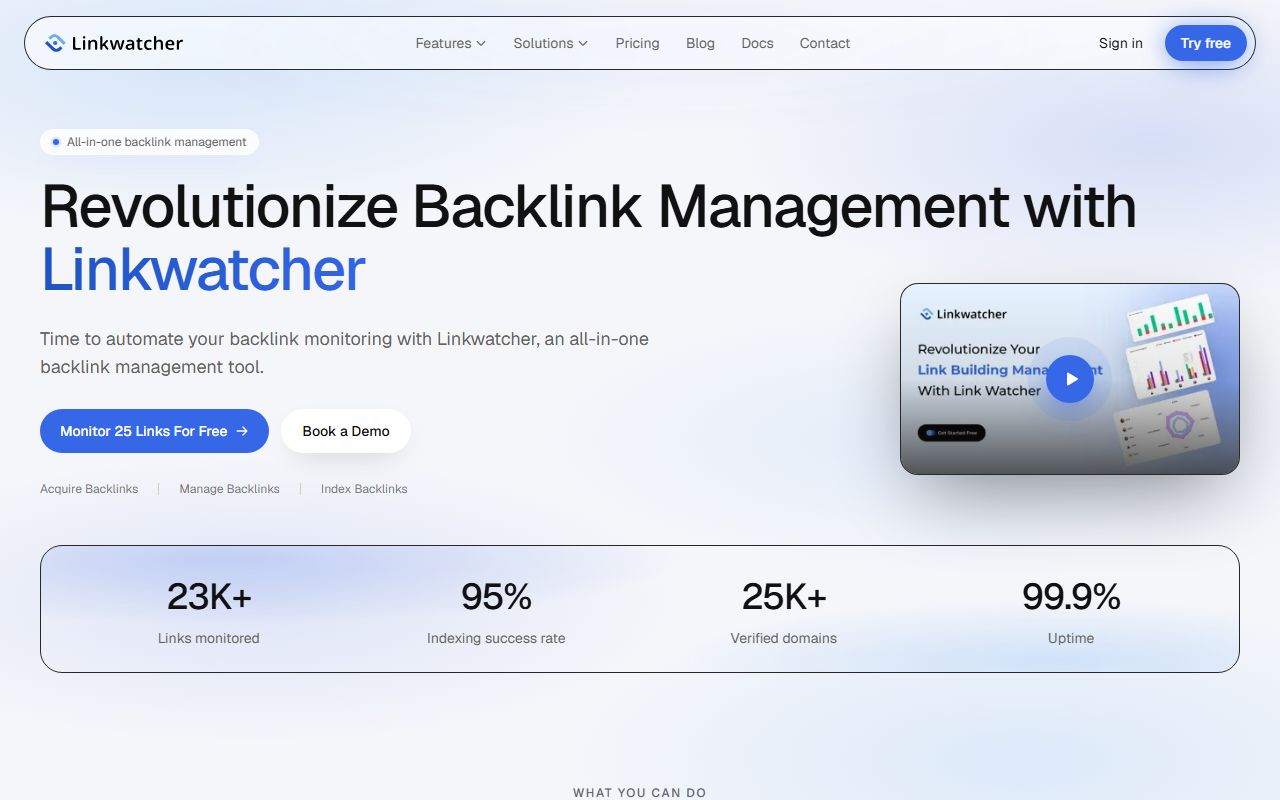
The screenshot is plain about the promise: a blue button reading “Monitor 25 Links For Free”, and underneath it three words, Acquire, Manage and Index Backlinks. Behind that button is a dashboard. Here is the routine, from the product's own docs.
- You add links. Paste one referring page, paste a list, or upload a CSV. The dialog explains: “We will check if the link added above has a valid backlink to this project URL”.
- First scan. The docs say fetching live data typically takes 7 to 15 minutes.
- Daily re-checks. Every link is revisited every 24 hours, and you can trigger a manual rescan.
- Status cards. All Links, Found, Do-Follow, No-Follow, Indexed, Issues and Pending, with a per-link “Watcher Score” coloured from red up to dark green at 80 and above. How that score is calculated is not published.
- Alerts and reports. Warnings at Critical or Warning severity, and email reports daily, weekly or monthly. Public report links let a client look without logging in.
Around this core sit three more products: a guest-post marketplace with an AI buying assistant, a link indexer that charges one credit per submitted link, and a keyword rank monitor. We cover only the monitoring side here, because that is the part a census can be compared with.
What the watchman charges, in plain arithmetic
Linkwatcher prices by how many links you ask it to watch. These are the monthly prices from its pricing page, in US dollars. A yearly toggle advertises “Save 17%”, but we did not capture those yearly amounts, so they are not shown.
| Plan | Per month | Monitored links | Keywords |
|---|---|---|---|
| Free | $0 | 25 | 0 in the plan table |
| Freelancer | $29 | 500 | 50 |
| Collaborator | $69 | 1,000 | 100 |
| Agency | $129 | 2,500 | 300 |
| Enterprise | $249 | custom | custom |
Divide it out: Freelancer works out to about 5.8 cents per watched link per month, and Agency to about 5.2 cents. Those are the prices of a watchman who walks every day. Indexer credits are separate, from $15 for 1,000 credits.
Our pricing is a different shape. One credit is $0.0001, free actions cost nothing, a lookup costs 1 credit and a list call costs 2. That is $0.10 per 1,000 lookups and $0.20 per 1,000 list calls, and one list call can return up to 1,000 rows. New accounts get a $100 free credit on first Google sign-in, with no card. The two bills cannot be compared line for line, because you are buying different things: daily attention to your list against on-demand answers about anyone.
Where Linkwatcher is the better choice, and who should stay
Be honest about this part, because it is most of the decision. Stay with Linkwatcher, or pick it first, if any of these is you.
- You bought links and want proof they are live. It checks each link you list every 24 hours. Our index is refreshed roughly monthly. For “is the placement I paid for still there today”, the watchman wins by a wide margin.
- You want to be told, not to ask. It sends alerts and scheduled emails. We have no alerts, no monitoring, no email reports and no scheduled exports. Those are on our list of things we do not have.
- You report to clients. Shareable report links, CSV export and a per-user overview exist on its side. We have no dashboards to share. Analytics pages are not on its Free plan, so budget for a paid tier.
- You are not a developer. A dashboard with a Rescan button needs no code. Ours is an API plus a free explorer for browsing a domain's report.
- You want link building, indexing and rank tracking under one login. We do not build links, sell links or index pages. We provide data.
Its own comparison pages are candid about limits too: it says Linkody is cheaper at the entry tier, and that many teams run Linkwatcher alongside a bigger suite rather than instead of one. The honest summary is that it is a good watchman, and we are not trying to be one.
What the census can do that a watchman cannot
A watchman, as far as its docs show, works from your list. That has two consequences for a newcomer.
First, you must already know a link exists before you can watch it. The docs describe adding links by pasting a URL, a list or a CSV. Whether Linkwatcher discovers backlinks you did not add is not published. A census answers the opposite question: who links to this domain at all? Our refdomains call returns the top referring domains of any target, and backlinks returns the individual links with source URL, anchor, rel and last-seen date.
Second, you can look at someone else. A watchman works for one client. With a census you can check a prospect before you buy a link on their site, size up a competitor, or compare twenty domains side by side with compare. Two more actions help here: bulk_dr returns DR for up to 2,000 domains in one request, and intersect shows referring domains shared by two to ten targets.
You can poke at this for free. The profile for linkwatcher.io in our explorer needs no sign-in. The anchors, referring domains and the 780-link pile described above all come out of the same index you would query from code.
How to build a small watchlist yourself from the census
Say you hold thirty links and cannot justify a subscription. You can approximate the watchman with a few lines and a calendar reminder. It will be slower, and it is only as fresh as our monthly refresh.
- Make a list of your target domain and the thirty source domains you expect to link to it.
- Call
backlinksfor your target, filtered by source domain, and read the last-seen date on each row. - Group by registered domain, not by URL. The www split in linkwatcher.io's own profile shows why: 806 backlinks point at the non-www host and most of the rest at the www host, though both end up on one site.
- Compare this month's rows with last month's. A source that disappears from the results, or a last-seen date that stops moving, is your “link may be gone” signal.
- Run
refdomainsonce a month to see donor DR and which new domains showed up.
This is a view you are assembling, not a feature we ship. Full parameter lists are in the API docs. And because it is plain JSON, you can drop the output into a spreadsheet or your own dashboard.
If the real need is to check what the crawl sees for a page you just got indexed, a census call is a decent sanity check. Do not expect it to catch something published last Tuesday.
Choosing in three questions
Strip it down to the town analogy one last time.
Do you need someone to walk past your doors every day?
Then it is a watchman. Take the free 25-link plan, see whether the daily checks and alerts earn their place, and move to $29 only when 25 stops being enough.
Do you need to look up any address in town, from a script?
Then it is a census. Spend the starter credit on a handful of calls and read the output.
Do you need both?
Some people do, and the two do not clash. Use a watchman for the dozens of placements that matter this month and a census to vet new prospects and see what everyone else's profile looks like. If you are weighing other dashboard tools too, the backlink checker comparisons sit in one place, and the VeriBacklink page covers a close neighbour.
One caution for newcomers: neither tool promises rankings or traffic. They tell you what links exist and whether they are still there. What you do with that is your call.
apibacklinks vs Linkwatcher
| apibacklinks | Linkwatcher | |
|---|---|---|
| Main job | JSON API over our own backlink index, 19 actions plus a free browser explorer | Monitoring of backlinks you add, plus a guest-post marketplace, link indexer and keyword rank monitor |
| Where the links come from | our web link data, 2.77B domain-to-domain links, any domain | Links you paste, list or import by CSV; automatic discovery not published |
| Freshness | Refreshed roughly monthly, not real-time | Each link checked every 24 hours (per its own comparison page) |
| Alerts and email reports | None | Critical/Warning alerts; email reports daily, weekly or monthly |
| Entry price | $100 free credit on first Google sign-in, no card; then from $0.10 per 1,000 lookups | Free plan with 25 links; Freelancer $29/month for 500 links |
| API | One endpoint, 19 actions, key or Bearer token for paid actions, CORS enabled | Partner API for the marketplace only (Marketplace Enterprise, $45/month); monitoring-data API not published |
| Quality metric | Our own DR, 0 to 100, computed from referring-domain counts | A per-link Watcher Score; calculation not published |
| Exports and sharing | JSON, up to 1,000 rows per call | CSV export and public report links; analytics not on the Free plan |
| Rank tracking | None | Keyword rank monitor, 50 keywords on Freelancer |
Try it on linkwatcher.io
Ask the census who links to linkwatcher.io, top 20 referring domains with donor DR and first/last seen dates.
curl "https://apibacklinks.com/api.php?action=refdomains&q=linkwatcher.io&per=20&key=YOUR_KEY"
Linkwatcher alternative — FAQ
Is apibacklinks a drop-in replacement for Linkwatcher?
Does Linkwatcher have an API for my backlink data?
How many links can I watch for free?
Is your DR the same as the score other tools show?
Can I see what the crawl knows about linkwatcher.io without signing up?
domain and overview actions are free and need no key, and the explorer on our site shows the same profile in the browser. Paid actions use the starter credit.Which should a beginner start with?
Backlink data for the price of a rounding error
Sign up, keep your $100 of credit, call the API today.
Get started free