

A Backlink Monitor alternative, taken apart one layer at a time
Backlink Monitor promises to tell you when a link you built goes missing. We open the box: what the dashboard does, what the plans cost, where it stops, and what an API call can do instead.
We looked up backlinkmonitor.com in our own index. It shows 43 referring domains and 133 backlinks, a DR of 23 (our metric, not Ahrefs DR or Moz DA), with 74 dofollow and 59 nofollow links, first seen in August 2025. Two sites account for a third of everything: verygoodalternatives.com sends 25 links across 20 pages and linkwatchr.com sends 19, together 44 of 133, and neither is followed. linkwatchr.com is itself a competing monitor with a guide about Backlink Monitor alternatives, which is why contact page is the fourth most common anchor.
The best single link is the least expected. google.com, DR 99, appears with the anchor privacy policy: it comes from the Chrome Web Store listing of the free “Link Checker by BacklinkMonitor” extension, which points to the policy page. Add an Arizona business-school news page (the only .edu referrer, dofollow), eight links from a Black Friday deals roundup with the anchor Explore Deal, and launch directories, and you can see how a small monitoring tool gets found. The three top anchors are all spellings of the brand name and make 75 of 133 links, or 56.4%.
Backlink Monitor at a glance
- What it is
- A hosted dashboard that monitors backlinks you add or bulk-upload and alerts you when their status changes
- Check cadence
- Its FAQ says links are re-checked every 24 to 48 hours; alerts can be daily, weekly or off
- Plans
- Free (20 links), Starter $11.99/mo (500 links), Pro $29.99/mo (2,000), Agency $59.99/mo (5,500), more tiers behind “More Agency Plans”
- Alerts
- Email on all paid plans; Slack from Pro upward
- Free tools
- Backlink Status Checker, and a bulk DA/PA checker for up to 50 URLs using Moz scores
- API
- None found on the site; /api and /docs return its 404 page
- Company
- Ananta Innovations Limited, Birmingham, UK (per its privacy policy); founder named on its webinar page
Layer one: the promise printed on the homepage
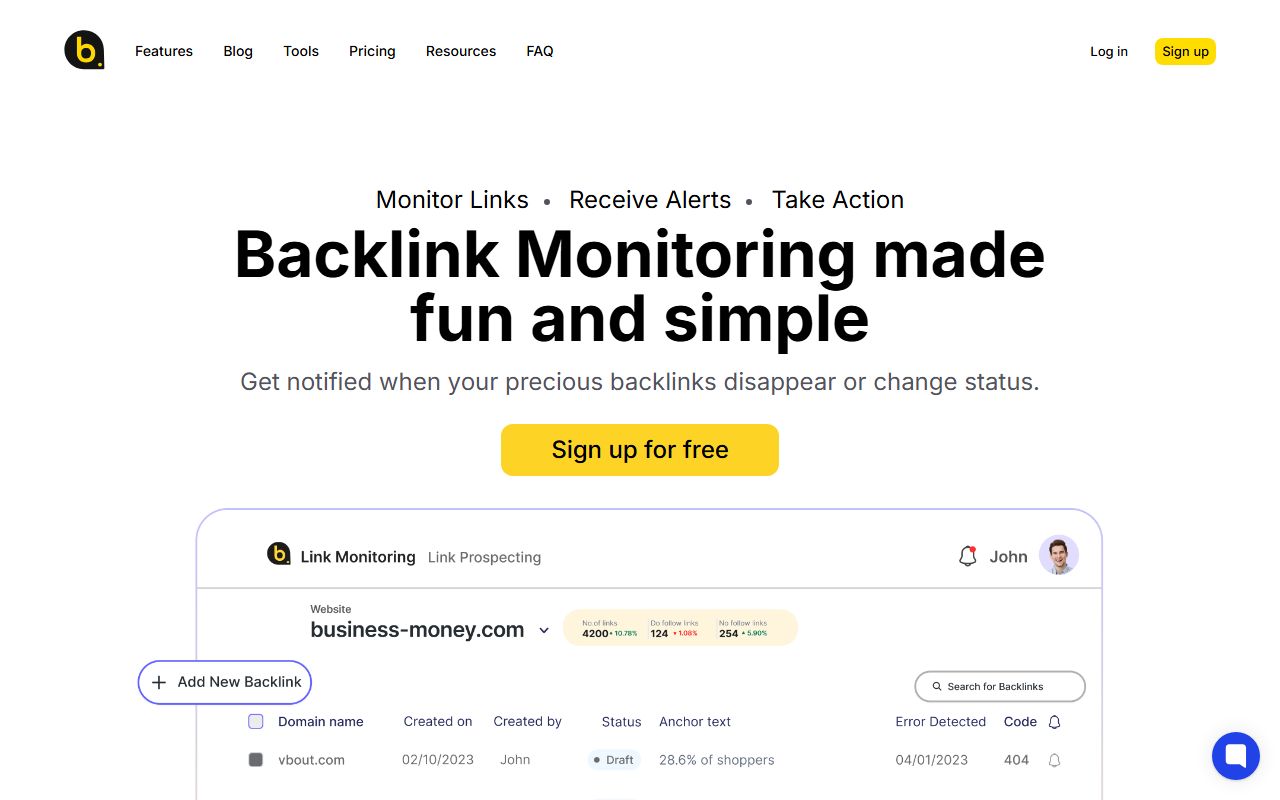
Open the homepage and the first thing you meet is a small line, Monitor Links • Receive Alerts • Take Action, then a big black headline: “Backlink Monitoring made fun and simple.” Under it sits one yellow button, “Sign up for free”, and below that a mock-up of the product itself. The mock-up is worth a minute, because it tells you what the product thinks a backlink is. There is a website selector, counters for total links, dofollow and nofollow, an “Add New Backlink” button, and a table with columns for domain name, created on, created by, status, anchor text, error detected and an HTTP code. The sample row shows a 404.
In short, a link spreadsheet where the column that matters is the status.
One small thing to check before you commit: the copy says “real-time” and “instant” in several places, while the FAQ says links are checked every 24 to 48 hours. Both are the company’s own wording. For the job it does, a daily-ish check is plenty. Just read “real-time” as “automatic”.
Layer two: the mechanism, and why you supply the links
Here is the part new users often miss. Backlink Monitor does not start from a map of the web. You give it URLs: the page where your link lives and the page it points to, one at a time or by bulk upload. It then re-checks the pairs on a schedule and alerts you when a link's status changes. The free Backlink Status Checker shows the same three fields (Link Status, Link Type, Anchor Text) for a single pair, without an account.
Around that core sit the conveniences: categorising and editing links, a “Link Location” feature that, in the site’s words, finds the location of backlinks, multi-user login, and Slack or email notifications. The pitch for bulk upload is that you finish a campaign, paste the list from your tracking sheet, and stop thinking about it.
Notice what the site does not describe. It never says how a link you do not know about would find its way into your account. The meta description mentions “new and lost links”, but every workflow the pages walk through starts with you adding a link. We will not guess beyond that. The dashboard also shows a “Link Prospecting” tab in its mock-up, and the site does not explain it, so we leave it alone too.
So think of the mechanism as a watch-list, not a map. A watch-list answers “is my link alive?” very well. It cannot answer “who else links to me?” or “who links to my competitor?” because nobody has told it where to look.
Layer three: the price ladder, rung by rung
The pricing page is refreshingly plain. All prices are in USD, you can change plans or cancel, and refunds are available within 14 days. These are the main tiers as listed on the monthly view:
| Plan | Per month | Links monitored | Domains | Users | Alerts |
|---|---|---|---|---|---|
| Free | $0 | 20 | not published | not published | not published |
| Starter | $11.99 | 500 | 1 | 1 | |
| Pro | $29.99 | 2,000 | 6 | 3 | Email and Slack |
| Agency | $59.99 | 5,500 | 25 | 6 | Email and Slack |
Yearly billing is advertised as “2 Months Free”. A “More Agency Plans” control leads to bigger tiers whose figures sit in the page’s embedded data rather than in the visible text, so we do not quote them here; check the live page.
Do the arithmetic with a hypothetical case. Say you have built 700 links over a year. Starter caps at 500, so you land on Pro at $29.99. That is about $0.043 per link per month on Pro, versus about $0.024 on a full Starter. A competitor’s guide made this same point about the steps, and it is a fair reading: the tiers are blocks, so the price per link depends on how neatly your list fits one.
Two terms deserve a read before you pay. Unused monitoring quota does not carry over to the next month, and the FAQ warns that after cancelling you may lose access to historical data, so download your reports first. Neither is unusual, and both are stated up front, which is to the company’s credit.
Layer four: the free tools that bring people in
Most of the site’s visibility comes from things you can use without paying. The Backlink Status Checker is one. The other is a bulk DA/PA checker, which takes up to 50 URLs at once and returns Moz’s Domain Authority and Page Authority; the site says a premium plan raises that to 100. Notice that this tool reports a third party’s metric. It is a checker form with a sign-up offer attached, and the FAQ says as much by pointing to Moz as the source of DA.
Then there is the Chrome extension, “Link Checker by BacklinkMonitor”. We could not read its store page (the browser was redirected to a consent screen), so we will not quote its user count or rating. What our index can tell you is that the listing links to the site’s privacy policy, and that single link is the highest-authority referrer in the profile. A free utility listed in a store can pick up a high-authority link just by existing.
Where Backlink Monitor is the better choice
Let us be direct, because a teardown that finds no strengths is just a sales page. If your question is “did the link I paid for last month survive?”, Backlink Monitor is built for exactly that and we are not.
- It tells you when something changes. apibacklinks has no alerts, no email reports and no “lost links” report. Nothing in our service will ping you. Backlink Monitor will, by email or Slack, daily or weekly.
- It checks the page you name. Our data comes from our own web data, a broad sample of the web refreshed roughly monthly. A link added this week might not show for weeks. A tool that revisits your own list every day or two is simply fresher for that list.
- It is a finished interface. Your account manager or client can log in, filter, and see a red 404 without writing a line of code. Multi-user logins start at Pro.
- The entry price is low. A free plan with 20 links and a $11.99 tier for 500 is a gentle start. A roundup from Getalink, a company that sells its own monitor, also called it one of the cheapest options for pure link watching.
So who should stay? A solo SEO, a small agency tracking a few hundred purchased placements, or anyone whose monthly ritual is “open the sheet, find the dead ones, ask for a fix.” Use the dashboard, set the alerts, and keep your time for outreach. If that describes you, you can close this tab with a clear conscience.
Layer five: the limits, stated kindly
Every product has edges, and these are the ones we found. They are about shape, not quality.
No public API. We checked the homepage, pricing, tool pages and footer and found no developer link. The paths /api and /docs return the site’s 404 page, and a third-party roundup says the same about webhooks. Slack and email are the only integrations the site names. If you want link status inside your own dashboard, your client report, or a nightly script, you cannot pull it out programmatically as far as we can tell. A report download exists, but its formats and limits are not described.
Link count is the unit of everything. Your plan is a number of links, and the number is fixed per tier. Good for predictability, awkward if your list swings between 400 and 900.
It looks at your list, not at the wider web. The site does not describe a way to study a domain you do not already track. Researching a competitor, sizing up a prospect’s donor sites, finding who links to two rivals but not to you: these need a data source, not a watch-list.
Building the same view yourself, with honest caveats
Suppose you are a developer, or you work with one, and you want the table from that homepage mock-up inside your own system. Here is how far an API call takes you, using the apibacklinks documentation as the reference.
The backlinks action returns individual links: source URL, anchor, title, rel, nofollow flag, link type and last seen date, with filters for follow type, source TLD, anchor text, source domain, target URL, minimum donor DR and date range. That covers the “domain, status type, anchor text” columns of the mock-up. One call returns up to 1,000 rows and costs 2 credits, which is $0.0002, so a thousand such calls cost twenty cents. The refdomains action gives the top referring domains with links, dofollow counts and donor DR, and anchors gives the top 50 anchors.
A do-it-yourself weekly diff then looks like this:
- Save the
backlinksresponse for your target into your own table every week or month. - Compare this snapshot with the last one. Missing source URLs are candidates for “lost”, new ones are candidates for “gained”.
- Send the diff to wherever your team already looks, in whatever format you like.
Three caveats, and they matter. First, our index is refreshed about monthly, so a weekly snapshot will often show nothing new. Second, a link missing from a sample of the public web is not proof the link was removed; the crawl may simply not have revisited the page. Third, we offer no alert, no scheduler and no shared interface. You write those yourself. For a placement you paid for, a daily check of a known URL beats this approach every time.
The real strength of the API appears when the question is bigger than your own list. You can browse the same data without code in the free explorer report for backlinkmonitor.com, or compare twenty domains at once with compare, or ask intersect for referring domains shared by two to ten rivals.
A mentor’s rule of thumb: watch-list or map?
When someone new to link building asks me which tool to buy, I ask one thing first: do you already know your links, or are you still looking for them?
If you know them (you bought twelve guest posts, you have a spreadsheet of forty directory listings), you need a watch-list. Backlink Monitor is a good, inexpensive one. The free plan covers 20 links, which is enough to test whether the alerts are useful to you before you pay anything.
If you do not know them yet, you need a map: who links to my site, who links to my rival, which domains are worth approaching, how the anchor text is distributed. A map is data, and data is better pulled by code or read in an explorer than watched in a dashboard. That is the lane for apibacklinks: DR, referring domains, anchors and linked pages from our own index of 181,132,097 domains, and none of the alerting.
Plenty of teams need both, and that is fine. Map the web with an API, build or buy your links, and put the ones you paid for on a watch-list. Our sibling comparisons look at other tools in this family, such as Znajo, and the backlink checkers hub lists them side by side.
apibacklinks vs Backlink Monitor
| apibacklinks | Backlink Monitor | |
|---|---|---|
| Core job | Look up backlink data for any domain through a JSON API and a free explorer | Monitor backlinks you add, and alert you when their status changes |
| Where the data comes from | Our own index built from our web link data: 181,132,097 domains, about 798.6 billion page-level backlinks | Pages you list, re-checked by the service; its own index is not described |
| Freshness | Refreshed roughly monthly, not real-time | Links re-checked every 24 to 48 hours, per its FAQ |
| Alerts | None: no alerts, no email reports, no lost-links report | Email, plus Slack from the Pro plan; daily or weekly digests |
| Pricing model | Pay per call: 1 credit is $0.0001; from $0.10 per 1,000 lookups, $0.20 per 1,000 list calls | Monthly plans: $11.99, $29.99, $59.99 and larger tiers by link count |
| Free entry | $100 free credit on first sign-in with Google, no card | Free plan that monitors up to 20 backlinks |
| Public API | Yes: 19 actions on one endpoint, JSON, CORS enabled | None found on the site |
| Authority metric | Our own Domain Rating (0 to 100); not Ahrefs DR or Moz DA | Moz DA and PA in its free bulk checker; per-link metrics inside the dashboard not published |
| Team and client access | No dashboards to share; data goes into your own tools | Multi-user logins: 1 on Starter, 3 on Pro, 6 on Agency |
Try it on backlinkmonitor.com
Pull the top referring domains that currently point at Backlink Monitor, with donor DR and dofollow counts, then diff them against last month yourself.
curl "https://apibacklinks.com/api.php?action=refdomains&q=backlinkmonitor.com&key=YOUR_KEY"
Backlink Monitor alternative — FAQ
Is apibacklinks a drop-in replacement for Backlink Monitor?
Does Backlink Monitor have an API?
/api and /docs paths return its 404 page. If that has changed since 2026-10-09, the official site is the place to confirm.How often does Backlink Monitor check links?
What does Backlink Monitor cost?
Can I use apibacklinks to see if a paid link is still live?
backlinks action by your target and source domain to see whether the link appears in the latest crawl data. Because the index updates about monthly and is a sample, a daily watcher is the better tool for confirming a single placement.Is your DR the same as the numbers in Backlink Monitor?
Backlink data for the price of a rounding error
Sign up, keep your $100 of credit, call the API today.
Get started free