

A MozCheck.net alternative, explained for someone who has never checked a domain score
MozCheck.net is one input box and a button that promises your Domain Authority. Here is what that number means, what the tool's own backlink profile looks like, and how to get a score by plain URL instead.
Here is the odd part. A tool whose entire job is to report authority has very little of its own in our index. We see 4 referring domains sending 5 backlinks to mozcheck.net, three of them dofollow, giving it a DR of 10. The index first saw a link on 2025-08-09 and the latest on 2026-07-21. The average DR of those four referrers is 30, and none are .gov or .edu.
Only one referrer has a high DR: jimdo.com (DR 67) links twice, both dofollow, with the anchor "Domain Authority", and both point at the French page /indexfr.php rather than the homepage. The other three are bare-URL mentions with the anchor "mozcheck.net": ourcutebabies.com (DR 23), pick4d.live (DR 18) and marketingexperts.click (DR 14). Each was seen in exactly one crawl. Pages like these are often directory or tool lists, though we have not opened them to check. Our index is a sample of the web, so a small site can have links we have not seen.
MozCheck.net at a glance
- What it is
- A browser form that checks a website's Moz Domain Authority. Its headline reads "Free Moz Rank Checker Tool".
- Inputs
- One field with the placeholder "Wich website to Moz Check ?" and a Check button. One domain per check.
- Languages
- English, plus a French version at /indexfr.php ("Tester Gratuitement votre Domain Authority").
- Price
- Not published. The only signal is the word "Free" in the headline.
- API / bulk
- None found. No docs, key, CSV upload or export is visible.
- Who runs it
- The footer shows "S. DUBOIS" and a 2016-17 copyright range. No company, country or founding date is stated.
One box, one promise: what the MozCheck.net page does
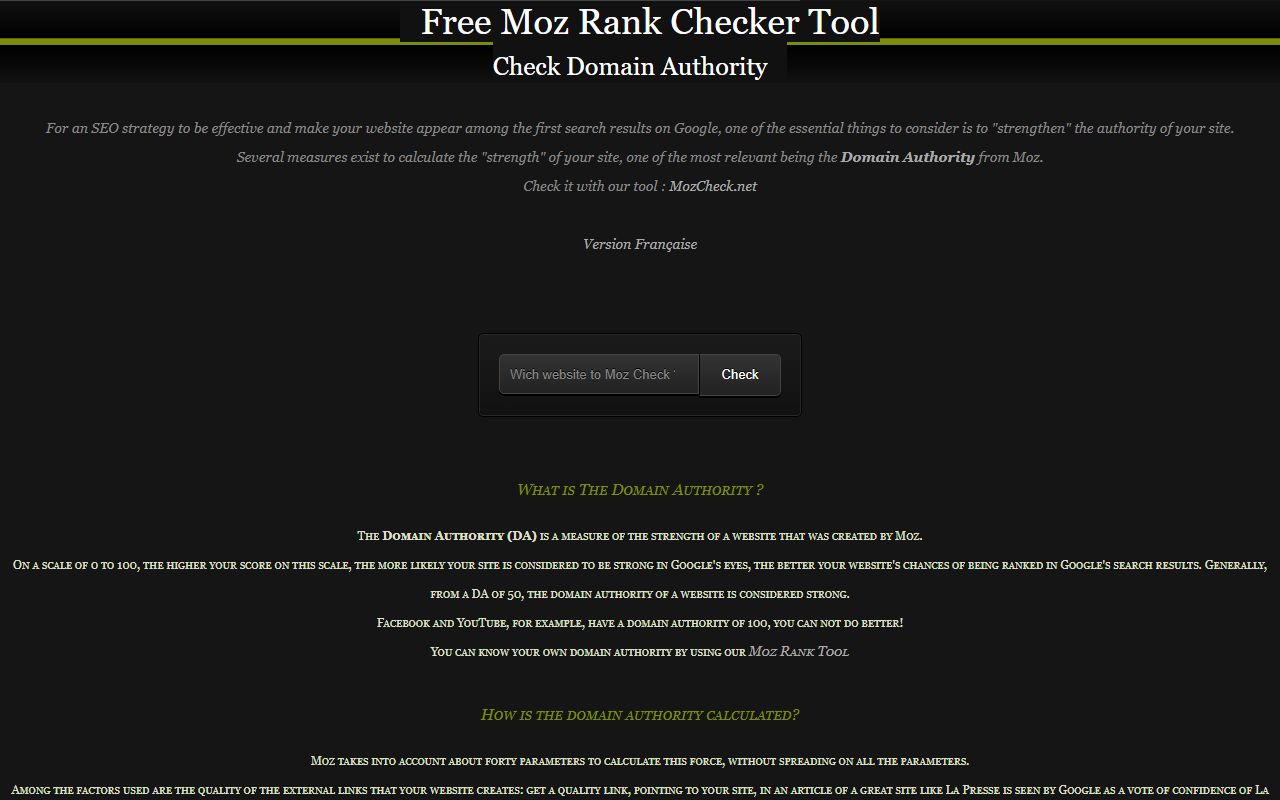
Open mozcheck.net and there is almost nothing to read before you reach the tool. A near-black page, a white serif headline, "Free Moz Rank Checker Tool", and under it "Check Domain Authority". In the middle sits a single input box with a button marked Check. That is the whole interface. There is no menu, no logo, no pricing table and no sign-in in the screenshot we captured.
The page explains itself in a few paragraphs. It says the Domain Authority "is a measure of the strength of a website that was created by Moz", that it runs on a scale of 0 to 100, and that "from a DA of 50" a site is generally considered strong. It also says Facebook and YouTube score 100. If you have never heard the term, that short explainer is the point of the site: it teaches the idea, then hands you the form.
One caution about what we know. We read the page and its HTML; we did not submit the form. So which numbers come back, and where they come from, are things this guide cannot tell you. Treat any statement about the result page as unverified.
Think of authority as a pile of reference letters
The easiest way to understand any domain score is to imagine a job applicant. The applicant says they are good at the work, but employers care more about the reference letters. A letter from a respected person counts for more than ten from strangers. Authority scores work the same way. Your site is the applicant, and every other site that links to you is a letter.
The MozCheck.net page makes the same point in its own words: the amount of links pointing at a site "is also counted, but weighs less than the quality of the links". It also says Moz takes into account "about forty parameters". We cannot see inside that calculation, so we will not describe it. What we can say is the shape of the idea. Few good letters beat many weak ones.
We will keep this letter picture for the rest of the guide. A referring domain is one writer. A backlink is one letter, and one writer can send several. A dofollow link is a letter written as an endorsement; nofollow is the writer saying "I am mentioning them, but not vouching". And anchor text is the sentence the writer used to introduce you.
The four writers who vouch for mozcheck.net
Because the profile is tiny, we can list every referrer in our index.
| Writer (referring domain) | Letters | Endorsed (dofollow) | Introduced as | Our DR |
|---|---|---|---|---|
| jimdo.com | 2 | 2 | Domain Authority | 67 |
| ourcutebabies.com | 1 | 1 | mozcheck.net | 23 |
| pick4d.live | 1 | 0 | mozcheck.net | 18 |
| marketingexperts.click | 1 | 0 | mozcheck.net | 14 |
Read it like an investigator would. Four writers, five letters. One writer, jimdo.com, a site builder host, has by far the highest DR and sends two of the five letters. Its two letters use a descriptive phrase, "Domain Authority", which tells a search engine something about the topic. The other three just print the web address, which tells a reader where to go but says little about subject matter.
The French page is the quiet winner. Both jimdo.com letters, 40% of all links in our index, point at /indexfr.php and not the English homepage. If you ran this site, that is a clue about which language audience is linking to you. You can browse the same list yourself in the free explorer, no sign-in needed.
Why two tools give two different numbers
Here is the point beginners trip over most. There is no single official "authority" number that every tool shares. Each provider builds its own score from its own crawl and its own formula, and the results differ.
In our index mozcheck.net has a DR of 10. A separate site profile we checked showed DR 7 for the same domain. The gap is expected: each service computes its score from its own data and formula. And neither number is the Moz Domain Authority the MozCheck.net form is built to report.
Our DR runs 0 to 100 on a logarithmic scale, computed by us from referring-domain counts in our own graph. That makes it comparable in spirit to DA, but it is not Moz DA and not Ahrefs DR. As a calibration point, ahrefs.com itself shows DR 67 in our index. So when you compare, compare scores from one tool against each other: your site versus a competitor, both measured the same way. Never mix a number from one tool with a threshold from another.
The page's rule of thumb, "from a DA of 50" a site counts as strong, belongs to Moz's scale. Do not carry it over to a DR figure.
Where MozCheck.net is the better choice
For a beginner, a one-box form has real advantages, and we would rather say so plainly.
- Zero setup. You type a domain and press a button. There is no key to copy, no code to write, no JSON to read.
- Moz's own scale. If a client, a forum rule or a marketplace listing asks for "DA" specifically, a tool built around Moz Domain Authority speaks that language. Our DR cannot substitute for it.
- It teaches as it goes. The page defines DA, gives a 0 to 100 range and a rough threshold in plain sentences. Our API returns data and assumes you know what to do with it.
- One-off curiosity. If you check a domain twice a year, building anything is overkill.
If that describes you, stay. There is nothing wrong with a free form for a free question. Two honest limits on the other side: MozCheck.net publishes no pricing, API or contact page, and its footer shows a 2016-17 copyright range. We cannot say how fresh its data is or who stands behind it, so test it before you build a process on it.
When one input box stops being enough
The form takes one domain per check. That is fine for your own site. It becomes slow the moment you have a list: twenty guest-post prospects, fifty expired domains, a competitor set. No bulk mode, CSV upload or export is visible on the page, so each domain means one visit to the box.
The second gap is the reason behind the number. A score tells you the grade, not the reference letters. If mozcheck.net shows a modest score, you do not learn that jimdo.com is behind two of its five links. For that you need the list of linking domains and the anchors, which is what a backlink API returns.
This is where the roles split. A form answers "what is the grade?" An API answers it too, then lets you ask "who wrote the letters?" and "do the other eighty domains on my list look the same?" in the same request style. Other single-domain checkers sit in the same position; our domain rating tools hub places them side by side.
The same check, done by URL
An API is just a web address you can type into a browser. The domain action is free and needs no key:
https://apibacklinks.com/api.php?action=domain&q=mozcheck.net
The answer comes back as JSON: DR, backlinks, referring domains, dofollow counts, and the first and last dates a link was seen. Change the q value and you have checked a different site.
For a list, use bulk_dr, which takes up to 2,000 domains in one request. For the letters behind the grade, use refdomains (the top referring domains, up to 100, ranked by links) and anchors (the top 50 anchors). Paid actions use a key and cost from $0.10 per 1,000 calls; list calls cost $0.20 per 1,000 and can return up to 1,000 rows. New accounts get $100 of free credit on first sign-in with Google, no card required. Everything is documented in the API docs.
Know the limits before you start. The index is built from our own web data, so it is a broad sample, refreshed roughly monthly rather than in real time. A brand-new link can take weeks to appear. There are no traffic estimates, rank tracking or toxicity scores.
Five habits for reading any authority score
- Compare like with like. Use one tool for both sites, always.
- Open the letters. Look at the referring domains behind the score. In mozcheck.net's case, one writer out of four (jimdo.com) sends two of the five links.
- Read the anchors. Descriptive anchors such as "Domain Authority" and bare-URL anchors such as "mozcheck.net" do different jobs.
- Check the dates. Three of the five links here were each seen in a single crawl. A link seen once is less certain than one seen across many crawls.
- Remember it is a sample. Treat a low count on a small site as "low in this index", not "zero".
A score is a starting question. The useful work is reading the list that produced it.
apibacklinks vs MozCheck.net
| apibacklinks | MozCheck.net | |
|---|---|---|
| What it is | A JSON API plus a free online explorer for backlink and domain-rating data | A one-field web form for checking Moz Domain Authority |
| Authority metric | DR, 0 to 100, logarithmic, our own metric (not Moz DA or Ahrefs DR) | Moz Domain Authority, as described on its page |
| Programmatic access | 19 actions on one endpoint, JSON, CORS enabled | None found; no API docs or key |
| Bulk lookups | bulk_dr: up to 2,000 domains per request | One domain per check; no bulk mode visible |
| Sees the links behind the score | Yes: refdomains, backlinks, anchors, toppages | Not published |
| Price | From $0.10 per 1,000 calls; free actions cost 0; $100 free credit on first Google sign-in | Not published; the headline says "Free" |
| Sign-up | Not needed for free actions or the explorer | No account or login visible |
| Data freshness | Own index, roughly monthly refresh, not real-time | Not published |
Try it on mozcheck.net
List the referring domains behind mozcheck.net, the same four writers shown above.
curl "https://apibacklinks.com/api.php?action=refdomains&q=mozcheck.net&key=YOUR_KEY"
MozCheck.net alternative — FAQ
Is MozCheck.net the same as Moz?
Does MozCheck.net have an API?
Is apibacklinks DR the same as Moz Domain Authority?
Why does mozcheck.net show so few backlinks in your index?
Can I check a domain without writing code?
What do I do if I need to check hundreds of domains?
Backlink data for the price of a rounding error
Sign up, keep your $100 of credit, call the API today.
Get started free